code

2022年1月21日 星期五

Cloud Native - Designing Cloud Native Applications

 General Guides

每個服務商(e.g. Azure / AWS / GCP ...) 都有自己的cloud patterns guide,可以generalize成以下五點:

1. operational excellence - 在設計cloud native app的時候就要考慮維運與開發的因子,透過DevOps的practice來實踐:

a. 所有東西都要自動化 - 減少人為錯誤到最低程度,配合上Infrastructure as Code (IaC),整個環境設定都是程式控制。

b. 所有東西都要監控 - 對如何持續改善有幫助

c. 自動化文件化所有東西 - 透過Swagger這類tool

d. 所有動作都是reversible - 所以IaC是很重要的

e. 設計錯誤時的處理 - gracefully fail

2. 資安 - 目前普遍接受的說法是cloud application比地端要安全,但還是要特別著墨,採用defense-in-depth的approach,在設計架構時就把資安納入考量。以下是一個voting cloud app:
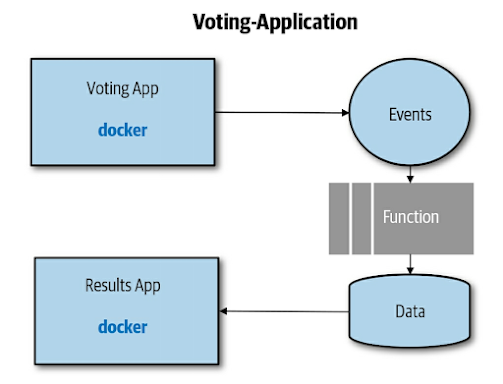

此app採用的defense-in-depth的方向如下(假設使用container + K8s):

 - 採用安全的code repository + CI整合靜態分析code安全性

 - container image: 永遠只加入與expose最低限度需要的東西

- container registry: 使用private registry來存放image,需要有權限控管,以及安全性掃描image例如使用Twistlock

- Pod: container images只能從被許可的registry pull後來,每個pod要有identity才能讓其中的程式存取其他的service,再來要考慮node-node間如何安全的通訊。

- Cluster and orchestrator: cluster要放在內網還是外網,以及要把Kubernetes RBAC enabled。

3. Reliability vs Availability

reliability - application能持續運作,即便存在某些錯誤。所以application要能被設計成即便發生錯誤持續使用之外,還要能恢復正常。

availability - application能被使用在一段持續的時間內,例如多個redundant instances or replicas。


4. Scalability and cost

1. 如果不自動決定何時該scale up,則需要在一開始就支付某個規模程度的cluster of nodes,則不是很cost-effective,因為多數時間可能都資源遠大於需求

2. 如果採取自動scale up當資源不足時,則會被啟動new node (VM)的速度遠慢於啟動container的速度所困擾,這需要考慮進去。可以考慮Container as a Service (CaaS)包含Azure Kubernetes Service virtual node,或是AWS Fargate。


Cloud Native vs 傳統架構

差異包括:

1. state處理 - state包含session / application configuration等,傳統架構通常是stateful的,通常暫存放於compute instance variables,所以需要load balancer透過sticky session的方式來確保同一個session都是連到同一個compute instance。


上圖中,LB發現VM0死掉的話,會將user 導向VM1,但是原本的session data將會遺失,造成問題。

而cloud native由於compute instances是動態增減的,所以在設計之初就會朝向stateless的方向去設計,通常session data是被外部化的存放於data store,不隨著compute instance的增減被影響。如下圖:


2. orchestration - 傳統架構通常使用service orchestration service來處理request,而且通常是synchronous等待的:


這樣synchronous waiting當然就有他的問題

cloud native通常採用event-driven pattern來溝通,把一個request分給多個低耦合的服務來執行稱為service choreography,每個service maintain自己的state:


上圖紅色方塊就是event-driven communication component,整個流程就是所謂的service choreography。


Functions vs Services

在設計一個application之初,就會面臨要選擇一個容器化的service,還是要走FaaS?

FaaS雖然比較適合短生命週期跟獨立的tasks,但目前許多FaaS已經成熟到能讓整個application都建立在FaaS上面(e.g. Azure Durable Functions or AWS Step Functions)。FaaS比較大的限制是執行時間timeout短(不能執行長時間運算的東西)

FaaS適合以下scenarios: 平行化獨立事件 / 排程 / map-reduce / message routing。

使用FaaS也有以下要考慮的問題:

1. 一個monolithic切分成小function的複雜度

2. 有限的執行生命週期

3. 目前尚無(人)法用特異化的硬體,例如GPU

4. 由於每個function沒有state,所以所有計算都要pass in data,並且pass out data,會有較多節點的溝通,形成網路上的延遲

5. local開發不一定能成立,因為FaaS不一定有local開發環境

6. FaaS不一定比較便宜,因為節省了compute instance cost,但是又加入了networking / storage / eventing等supporting services費用。


容器化的服務沒有以上的問題,所以可以混合使用services + FaaS來達成彈性。之前提到的voting application可以在某些component使用FaaS:


這個FaaS component只負責將event發生時的某些條件,變成data放入data store,非常方便去scale up。但是要注意FaaS scales up的時候,瓶頸會發生在與他對接的系統中,例如圖中的data store,所以好的practice是data store也採用managed services (e.g. AWS RDBMS)。

此外,你應該要知道自己的application scale的特性,例如container image大的話,根本就來不及在高峰期scale up,或是你的container雖然冷啟動很快,但是她依賴的相關的service要scale up的冷啟動時間很長,也會使得高峰期(busrt scenarios)的scale up失敗。


2022年1月20日 星期四

Cloud Native - Microservices

 Microservices Architecture

1. application被拆分成低耦合的多個小服務
2. 根據business / functionality 來區分服務範圍
3. 由不同的獨立team維運開發
4. services彼此間跑不同process,透過API溝通

monolithic arch 是微服務的對立面,有以下特徵:

1. single code base
2. shared data store / data structure


優點

1. 敏捷度 - 由於每個更動都侷限在某個小code base,部署/測試/開發 速度都變快
2. 持續創新 - ? 我覺得還好
3. evolutionary design - 由於影響範圍小,可以快速做技術更新
4. 小而美的team
5. 侷限性錯誤
6. 每個service可以有不同的scaling

挑戰

1. 複雜度提高 - 分散式系統的所有問題都會出現
2. data 完整度與consistency - 因為data store也是分散式的,所以也是會遇到分散式系統的問題
3. 效能 - API calls會增加networking overhead,需要使用某些design patterns
4. 服務版控 - 每個微服務都有自己的版本,在跟其他服務整合時,版本控管複雜度增加
5. logging/monitoring複雜度增加
6. service discovery - 所有component都是API溝通的微服務,需要好的方法來找到彼此


2022年1月12日 星期三

Cloud Native - Serverless Computing & Functions & Application Modernization

Serverless Computing 

Serverless computing意思就是讓programmer不用去理會底層所有的資源分配以及infrastructure,讓程式執行去啟動cloud provider自動做資源分配,把所有資源管理的工作都對programmer隱藏起來。

有提供serverless container包括:
1. Azure Container Instances
2. Azure SF Mesh
3. AWS Fargate
4. GCP Serverless Containers on Cloud Functions


Functions

Functions as a service (FaaS)包括:
1. AWS Lambda
2. Azure Functions
3. Google Cloud Functions

優點:快速啟動與快速執行(?),當然最大優點就是此服務的結構很簡單,通常是由其他event驅動,甚至執行結果也會驅動其他functions。當多個FaaS組成一個龐大的複雜服務時候,需要adopt某些design pattern來協作。

考量:
1. vendor lock-in,通常實作會跟FaaS平台綁定,變成不太portable
2. 當你想要跑在on-premise facility: 可以採用open source FaaS runtime,例如 Kubless / OpenFaaS, Serverless / Apache Open Whisk,甚至Azure Functions也已經open sourced。
安裝這些open source platform之後可以利用Kubernetes來資源管理。


From VMs to Cloud Native

怎麼從傳統VM走向Functions?
1. brownfield scenarios: lift-and-shift (負載平移) 透過application modernization以及optimization方法使之轉變
2. greenfield scenarios: 從頭開始創建一個cloud native application

透過lift-and-shift方式將現有的application搬移至IaaS,可立即享受cloud好處,但是管理的問題仍然很多(scaling / dependencies /.. )。如果搬遷到PaaS上,減少了底層管理事務,但受限於Paas架構於VM技術上,仍然會有之前提到的VM的(相對於Container) 一些問題。


Application Modernization

monolithic application透過container轉變成modern application,通常是採用微服務的架構,以及一些patterns (Strangler / Anticorruption Layer) 可以解決以下monolithic application的問題:
1. deployment is faster
2. 某些components會要更高的更新頻率,所以個別微服務的container可以節省很多啟動部署的時間
3. 某些components需要更大的scaling requirements,這跟2. 是類似優點
4. 某些components應該要用不同的技術發展,對monolithic application來說,單一的tech stack runtime較適合多人共同開發,但是如果可以切割成不同的小components,則各自可以有不同的tech stack,因為dependency不會是個麻煩
5. code base太大:monolithic的問題在於一個application share same code base,微服務則每個服務有自己的code base (12 app rules)

Orcehstration變成很重要,事實上Kubernetes 可以看作是cloud OS,所以目前主流的cloud vendors甚至提供了 Orchestrators as a Service,也就是將Kubernetes的管理部分變成一個managed service,不過開發者還是得懂Kubernetes如何維護運作,才能使用這類服務。

Application Optimization

application-level optimization也是必要的,找出適合function這種獨立回應的事件處理,例如CRUD operations (Create Read Update Delete),甚至可以整個application都建築在這些基本的function上面。


Cloud Native Fundamentals - Kubernetes

 Containers

containers算是application modernization的工具,是一種將OS資源slice成獨立的運算unit的工具 (OS virtualization)。好處:
1. 輕量化:可以快速部署啟動,因為採用copy-on-write來分享資源給多個containers,所以在磁碟空間和記憶體使用上非常輕量。
2. 確定性部署:因為所有的dependencies都被獨立打包了都被獨立打包了,所以部署時不會有什麼意外。

一個host可以跑多個VM,而每個VM上可以run多個container instances


比VM這種hardware virtualization來說,containers是比較佔優勢的,但是當考慮其他因素(例如資安),還是會使用VM方式來當作virtualization,不過也有類似Google Visor這種microVM,改善量體與啟動速度。

Container Orchestration

要掌管container的生命週期,需要一個orchestration管理工具,主要任務:
1. 開通與部署(provisioning / deployment)到cluster nodes上
2. 資源管管理
3. 監控
4. scaling
5. containers之間的load balancing

Kubernetes

代表性的工具就是Kubernetes(k8s),可以視為container平台 / 微服務平台 / 雲端portability layer。一個K8s cluster有以下components:
1. master components: 管理各個nodes的master nodes
2. worker node components: 負責維持部署的noe上的環境管理
3. addons: 其他支援性服務


Kubernetes提供CRI (container runtime interface) 讓支援K8s的container runtime實作。

Cloud Native - Introduction to Cloud Native

 Cloud native application 核心就是 distributed systems


有著以下特性:

1. 網路不可信任
2. 高延遲
3. 高頻寬需求
4. 網路不安全
5. 網路topology並非固定,隨時可能有新的node加入或移出,規格也可能改變
6. 無單一管理者,因為是分散式的資源
7. 資料傳輸需要費用,通常是外送資料(egress)會需要費用
8. 網路協定可能是非homogeneous
9. 通常只能在CAP (consistency / availability / tolerance)顧及其中兩項


12-factor app

cloud native application需要增加機器數目而非提高規格去達成scaling, 所以也要有不同的開發方式,有以下12因素:

1. 每個服務使用單一code base去佈建在不同用途的環境,例如production / testing
2. 利用containers (e.g. Docker) 或是dependency managers (e.g. Maven) 來管理dependency
3. configuration只存在於環境中,不可寫入source code
4. 第三方service也需要寫入configuration來達到降低耦合度
5. apply CI/CD practices
6. stateless processes,所以data會外存於service本身
7. data isolation,每個service自己管理data,外部程式只能透過API來存取
8. scale out
9. fast startup & gracefully crash
10. 讓各種環境 (dev / staging / production)盡量一致
11. log很重要,將之以data stream方式導向服務之外的儲存
12. admin tasks是short-lived processes (? 什麼意思)


2018年7月22日 星期日

Google IO 2018 - 用Android App Actions與Android OS深度整合

將現有的android app與android深度整合

Google assistant有個關鍵的entity叫做actions,那什麼是actions?


由於使用者非常少會再重複使用一個app (reengagement is low!!!),所以Google想要協助app developers把app的功能(actions)展現給使用者看,透過AI自動判斷目前使用者可能需要做的動作(Actions),而不只是App。

如果一個android app定義了自己的app actions之後,則這就是一個快速跟Google assistant app接口的方法,使用者可以透過Google Assistant做出task-based query,我們的android app actoins也能獲得展露頭角的機會。


 甚至是content-based query,google assistant會預測接下來使用者的動作,同樣也能讓我們的app actions浮現上來(例如以下查詢lady gaga的姓名,google assistant預測可能接下來的有許多買票或是訂購音樂相關的動作:)


也能在google search bar下方的action prediction出現:(android O之後)


還有就是一些OS深度整合(例如text selection預設action):


總之只要implement了app action,就有機會跟android平台(不只是手機OS) 做深度的整合。


Semantic Intents

Google已經幫我們把下圖中左邊的語意換成右邊的Intent with params:


我們programmer要做的就是在我們的apk中加入actions.xml,然後定義好裡面的fullfillments。


所謂intents,其實是一個semantic intents(注意這不是android intent! 這是Actions by Google這個平台定義的semantic intents),是需要被Google service分析過後的結過,而fulfillment是一個deep link直接指向我們app內可以提供內容或是action的頁面。以上兩者構成了actions.xml。

Semantic intents不是只有給android actions用而已,他可以在任何Google assistant能出現的地方,都被當作是一個intent。

這邊有一個可以integrate的東西叫做usage logging(透過Firebase app indexing api),這個可以幫助Android 將action suggestion 個人化(how?)


目前google 提供了不少built-in intents,當然還在持續增加中:


勁量使用built-in intents,因為這樣Google已經做好所有的semantic analysis,也不會有什麼ambiguity的空間,而且多國語言的語意分析也幫你弄好了,基本上只要專注在準備fulfillment就可以了。

App Actions基本上是黏著semantic intents和android intents的橋樑:


用URL當橋樑的好處是,這個資料型態還能符合很多其他的服務:


 Fulfillment

fulfillment可以有兩種model來形容:


 1. url template model: 基本上就是對那種app就能解決的問題來說適合的。此時actions.xml裡面定義的url是一個app中的deep link,而所謂的template就是語意分析引擎會把分析出來的參數填入url template中的place holder部分,這樣deep link到的頁面就能處理。

2. content-driven model: 這對content serving action有用,而且通常content會連結到網站上,所以此時的actions.xml中的url就是連結到某個我們有所有權的網站中的網頁,當然能夠符合structured data形式 (可以說semantic intent定義了動詞,而structured data定義了名詞或是受詞)是最好,這個要另外一篇來提了。


測試與提交actions.xml

這其實是把actions.xml送到 Actions on Google這個平台資料庫,這樣讓所有安裝google assistant的device (不限於android devices)都能使用。對android app來說,最簡單的提交方法就是放在apk裡面,然後submit到google play console:


不過在提交之前,要先測試吧!
Android studio有一個plugin叫做actions test tool可以用來測試actions.xml是否正常運作:


這個plugin能讓developer account單獨看到actions(即便submit到Actions on Google的database),其他使用者不會被影響到,接下來就是用Google Assistant來測試各種語言組合是否有正確連結到url defined in actions.xml。


URL Template-based example: Taxi app

這個叫車的app的actions.xml如下:


這個action使用的semantic intent為一個built-in intent ORDER_RIDE,使用者可能會說出以下的句子:

這個intent會被分析成以下的parameters,他們的type是schema.org/xxx:


可以看到在actions.xml中,fulfillment定義的urlTemplate是一個接受兩個參數placeholders(注意type) 的urls,不過這邊不一定要是http的schema。

如果在App Actions Test Tool中看到如下:


Content-driven example: Coursera app

coursera的android app已經做了這個app actions的深度整合,來看他們怎麼做的。

如果使用者說出以下:


Coursera app註冊了一個built-in intent,由於Google Assistant知道該怎麼parse這段語音成有意義的參數,所以這些參數會丟向Coursera app actions:


可以看到此TAKE_COURSE intent有定義一個parameter叫做course,那他的type是schema.org/Course,所以在每個Coursera app的網頁中,如果加上以下的strucutured data markup:


Google Assistant就能知道這個action要提供的url content是什麼,也就是一個fullfillment。

所以coursera app的actions.xml就是以下這麼簡單的幾行xml:


在test tool中看到會是這樣:


在Google Assistant中的互動中,take course就變成一個predictable actions,當然coursera app就會出現在此predicted action list中:


Usage logging with Firebase indexing APIs

整合這個的目的就是要讓我們的App Actions在Android的app suggestion中更能被看到。
Firebase提供api來記錄in-app action usages可以達到這個目的。


透過Slices與Android/Google App整合

Android 19+ 提供了Slices - 一個UI template有點類似widget,讓app的一些內容或功能呈現出來,可以被其他app所展現(例如Search, Gmail等)。

不過這又是另一個topic了。


如何與非Android devices整合 - Conversational Actions

以上說的利用actions.xml來定義app actions,這是只對android devices有用。那如果想要延伸到非android devices但是五億台google assistant enabled devices上呢?

基本上Google努力建置technology stack出來,而應用程式開發商就專注在experiences上:


由於這些非android devices共同的介面就是語音,所以就要定義另一個action介面:conversational actions。

待下回分解。

2018年6月21日 星期四

Android Architecture Components - Life Cycle Aware Components

簡介

這是Android官方推薦“正確寫一個Android App"的方法,這個官方推薦的方法由一些非常基本library以及pattern組成,稱為Architecture components,包括以下:

Lifecycles: 每個app必考慮的東西
Lifecycle-aware observables: 觀察lifecycles的方法
Lightweight ViewModel: 這是獨立於Activity和Fragment之外,可以單獨測試邏輯之處
Object mapping for sqlite


要解決什麼問題?

通常programmer把所有的邏輯(商業/UI/Data/與OS互動等)都寫在activity或是fragment中,不過activity事實上是設計來操縱UI與OS互動,越簡單越能避免life cycle造成的問題,主要是因為activity / fragment 這類型的class,programmer並沒有絕對掌控權,從instance creation到destruction都是OS決定,所以要盡量減少對這些class的dependency。

此外model應該永遠獨立於view之外,永遠不受到OS相關決定(回收記憶體之類)的影響。


Life-cycle Aware Components

我們通常會把某些邏輯或是object寫在一個activity或是fragment裡面,應且在life cycle callback中作出對應的動作。例如以下MyLocationListener instance會在MyActivity的onStart()和onStop() 時也去做start() / stop() 動作:

class MyLocationListener {
    public MyLocationListener(Context context, Callback callback) {
        // ...
    }

    void start() {
        // connect to system location service
    }

    void stop() {
        // disconnect from system location service
    }
}

class MyActivity extends AppCompatActivity {
    private MyLocationListener myLocationListener;

    @Override
    public void onCreate(...) {
        myLocationListener = new MyLocationListener(this, (location) -> {
            // update UI
        });
    }

    @Override
    public void onStart() {
        super.onStart();
        myLocationListener.start();
        // manage other components that need to respond
        // to the activity lifecycle
    }

    @Override
    public void onStop() {
        super.onStop();
        myLocationListener.stop();
        // manage other components that need to respond
        // to the activity lifecycle
    }
}

但是如果有很多類似的component在這個activity裡面,那他的life cycle callbacks就會充滿這類code,變得複雜難maintain。

此外我們不能保證async operations會在我們要的life cycle callbacks回來:

class MyActivity extends AppCompatActivity {
    private MyLocationListener myLocationListener;

    public void onCreate(...) {
        myLocationListener = new MyLocationListener(this, location -> {
            // update UI
        });
    }

    @Override
    public void onStart() {
        super.onStart();
        Util.checkUserStatus(result -> {
            // what if this callback is invoked AFTER activity is stopped?
            if (result) {
                myLocationListener.start();
            }
        });
    }

    @Override
    public void onStop() {
        super.onStop();
        myLocationListener.stop();
    }
}
可以看到在onStart()中,此myLocationListener要等待某個operation result回來為true才會啟動,但是有可能此Activity onStop()先發生了,然後此operation result才回來,所以又啟動了這個myLocationListener。這有可能造成了這個listener在我們未預期的狀況下活動。

android.arch.lifecycle提供了一些design pattern來幫助我們免於煩這些(鳥)事。


Life Cycle

LifeCycle這個class把某個有life cycle概念的component (e.g. Activity / Fragment / Service) 的life cycle給抽象化了,它有states和events:


所以對這個component life cycle有興趣的人,就可以implement LifeCycleObserver:

public class MyObserver implements LifecycleObserver {
    @OnLifecycleEvent(Lifecycle.Event.ON_RESUME)
    public void connectListener() {
        ...
    }

    @OnLifecycleEvent(Lifecycle.Event.ON_PAUSE)
    public void disconnectListener() {
        ...
    }
}

myLifecycleOwner.getLifecycle().addObserver(new MyObserver());


Life Cycle Owner

擁有LifeCycle的components必須implement LifeCycleOwner interface (AppCompatActivity的某個super class是implement這個interface的),所以最快的讓自己的activity或是fragment變成life cycle owner就是去繼承有implement這個interface的base class:
class MyActivity extends AppCompatActivity {
    private MyLocationListener myLocationListener;

    public void onCreate(...) {
        myLocationListener = new MyLocationListener(this, getLifecycle(), location -> {
            // update UI
        });
        Util.checkUserStatus(result -> {
            if (result) {
                myLocationListener.enable();
            }
        });
  }
}
剛剛的MyLocationListener就可以implement LifeCycleObserver:

class MyLocationListener implements LifecycleObserver {
    private boolean enabled = false;
    public MyLocationListener(Context context, Lifecycle lifecycle, Callback callback) {
       ...
    }

    @OnLifecycleEvent(Lifecycle.Event.ON_START)
    void start() {
        if (enabled) {
           // connect
        }
    }

    public void enable() {
        enabled = true;
        if (lifecycle.getCurrentState().isAtLeast(STARTED)) {
            // connect if not connected
        }
    }

    @OnLifecycleEvent(Lifecycle.Event.ON_STOP)
    void stop() {
        // disconnect if connected
    }
}

可以看到MyLocationListener並沒有override什麼interface method,而是依賴於annotations。我們說MyLocationListener是一個life cycle aware object。


如果不繼承已知的life cycle owner class的話,也可以自己去implement LifeCycleOwner interface,但是要透過以下的templates:

public class MyActivity extends Activity implements LifecycleOwner {
    private LifecycleRegistry mLifecycleRegistry;

    @Override
    protected void onCreate(Bundle savedInstanceState) {
        super.onCreate(savedInstanceState);

        mLifecycleRegistry = new LifecycleRegistry(this);
        mLifecycleRegistry.markState(Lifecycle.State.CREATED);
    }

    @Override
    public void onStart() {
        super.onStart();
        mLifecycleRegistry.markState(Lifecycle.State.STARTED);
    }

    @NonNull
    @Override
    public Lifecycle getLifecycle() {
        return mLifecycleRegistry;
    }
}


2018年6月10日 星期日

Google IO 2018 - Android Vitals

startup time

1. slow cold start: cold start超過五秒者:


定義為:
1. app 不在memory
2. app經過onCreate() -> Activity running

2. slow warm start: app已經在memory,重新叫起超過2秒者:


定義為:
1. app 在memory
2. app經過onCreate() -> Activity running

3. slow hot start: 某個已經launched activity又restart 到 onResume的時間的時間超過1.5秒者:


定義為:
1. app 在memory
2. app經過onRestart() -> Activity running

Detecting Crashes

Android Vitals是一個platform tool,所以可以在3rd party crash-detection sdk (e.g. Fabric Crashlytics)還沒起來前,就能偵測到crash!


Battery

這是最重要的效能指標,因為mobile device是很resource-limited。


1. 不要直接使用wake lock api,有可能因為bug造成螢幕/CPU永不關閉。改用:


2. 盡量少wake up

Permission

統計看來,user並不喜歡grant permissions:


Vitals會把這些permission列出來:


不過目前應該還是在beta吧?! 我們的app都看不到這些資訊。奇怪。


ANRs

這個是Android系統中惡名昭彰的代名詞,android vitals也是有偵測這個東西,這怎麼發生呢?

當main thread (UI thread) 被block住,無法處理render / ui input時,系統偵測到此狀態維持幾秒鐘之後,就會出現ANR警告。block的原因可能包括:

1. I/O operations: network, disk


上面這個function call看似沒有read/write operations,但實際上一但被instantiated,就馬上有read operations (SharedPreference implementation就是如此)。所以看似無害的code,實際上在main thread做了I/O operation了。

下面是另一個I/O example:


上面的code實際上在 access headerFields就會真的去讀取connection,甚至在某些版本的Android,連if ()中的URL equality comparison就會進行IO了!

不過developers哪有辦法知道所有這些眉角?????
還好Android提供一個debug api,可以讓我們在debug time抓出這些在main thread不該做的事:


penaltyDeath() 會造成runtime crash,所以記得不要在release版本時候打開!!!當違反strict mode crash之後,可以從log找到發生的行數:


2. long computation

這個就不用多說了,肯定是block。
要常態性使用Android Profiler來看哪些code有可能造成long computation。
Strict mode api也提供自己加入註解一段slow code,讓strict mode偵測到此slow code被main thread上執行時,可以penalty crash。

3. Interprocess communication (IPC)

既然另外一個process (通常是另外一個app)不受我們控制,我們當然不能在main thread去做IPC,否則有可能造成main thread上做一些blocking operations。

4. Multithreaded programming

使用一些synchronization primitives的時候,要很確定自己知道自己在幹嘛,否則有可能造成dead lock => ANR

android vitals的log可以幫助我們找出這類型的問題:


5. Slow BroadcastReceiver handling
我們宣告BroadcastReceiver在manifest中,如果一個broadcast進來,handler是在main thread上跑的! 所以不該做任何以上四點提到的operations。如果你的handler在10秒內沒exit,OS會殺掉整個process (app)。

所以要在handler中用另一個thread來做上面四點的事:


Crashes

我們常常為了怕某些狀況下會crash,而做一堆null check或是try-catch,不過目前Android官方建議全部使用Jetpack的架構來解決這些問題:


另外使用Kotlin的built-in nullity check,也是有幫助。